The best hoverboards for kids in 2026 combine fun features with robust performance and unwavering safety, with top models including the Hover-1 Dream, Gotrax Edge, and Gyroor Warrior Off-Road. These self-balancing electric scooters offer an exhilarating blend of adventure and independence, but selecting a safe, durable, and age-appropriate model requires careful consideration of wheel size, motor power, and crucial UL 2272 safety certification.
Types of Hoverboards for Kids
Hoverboards come in various designs, primarily differentiated by their wheel size and intended use. Understanding these distinctions is crucial for selecting a model that matches your child’s skill level and the terrains they’ll encounter.
- Standard 6.5-inch Wheel Hoverboards: These are the most common type and an excellent starting point for younger children and beginners. Their smaller wheels keep the board lower to the ground, offering greater stability and making them easier to mount, dismount, and control. Ideal for smooth surfaces like sidewalks, driveways, and indoor use, they are lightweight and highly maneuverable.
- 8-inch Wheel Hoverboards: Stepping up in size, 8-inch hoverboards provide more stability and better traction, making them suitable for children aged 10 and above or those with some riding experience. They can handle slightly uneven terrains, such as packed dirt or light gravel, more effectively than their smaller counterparts.
- 10-inch Wheel (All-Terrain) Hoverboards: Designed for the adventurous rider, these models feature larger, often pneumatic (air-filled) tires with aggressive treads. They excel on rougher surfaces like grass, gravel paths, and even some muddy trails, absorbing shocks for a smoother ride. With more powerful motors and higher weight capacities, they are generally recommended for older, more experienced riders or those who frequently venture off paved paths.
- Hoverboard Scooters (with Handle): While less common, some hoverboards integrate a handlebar for added stability and control, bridging the gap between a traditional scooter and a hoverboard. These can be a good option for children who need extra support while learning or for those who prefer the familiarity of a handlebar.
How to Choose the Best Hoverboard for Your Child
Making an informed decision involves considering several factors, from your child’s specific needs to the hoverboard’s technical specifications and safety ratings.
Determine Usage Needs
Begin by thinking about how and where your child will use the hoverboard.
- Purpose of Use: Is it for casual recreation, commuting short distances, or more adventurous off-road exploration?
- Intended Terrain: Will it primarily be used indoors, on smooth sidewalks, in parks with varied surfaces, or on rougher trails?
- Rider’s Age and Weight: This is paramount for safety and performance. Smaller wheels (6.5 inches) are generally recommended for children under 10, while older or more confident riders can graduate to 8-inch or 10-inch models. Always check the maximum and minimum weight limits to ensure the board functions optimally and safely for your child.
Key Technical Specifications
|
Our Picks for the Best Hover Board in 2026
As an Amazon Associate I earn from qualifying purchases.
|
||
| Num | Product | Action |
|---|---|---|
| 1 | Gyroor Self Balancing Scooters Seat Attachment - Go Kart Conversion for 6.5'' to 10'' Self Balancing Scooters, Adjustable Frame Length, Perfect for Kids and Adults |

|
| 2 | K1 Go-Kart Seat Attachment for Self-Balancing Scooters, Adjustable Frame Fits 6.5"/8"/10" Boards, Easy Install, Kids & Family Fun (Scooter Not Included)–Classic Black |
|
| 3 | Self Balance Scooter Seat Attachment 6.5” Two-Wheel Self Balancing Electric Scooter with LED Light Flash Lights Wheels |
|
| 4 | Self-Balancing Scooter Skin Hoverboard Sticker Adult e Scooter Electric Scooter for Adults Reflective |
|
| 5 | 8.5” All Terrain Hover Board, Off Road Self Balancing Scooter with Bluetooth and LED Lights, UL2272 Safety Certified |
|
| 6 | Razor Hovertrax 2.0 Hoverboard, UL2272 Certified Self-Balancing Hoverboard Scooter, for Kids Age 8+ |
|
| 7 | INMOTION E20 Electric Unicycle Hoverboard for Beginners – 14" Wheel, 900W Motor, 18.6 Miles Range, 12.5mph, UL2272 Certified – Lightweight & Safe Self-Balancing Scooter |
|
| 8 | K2 Self-Balancing Scooter Go Kart with Rear Shock Absorption, Balancing Scooter Seat Attachment for 6.5" 8" 10" Tires, Adjustable Length & Off-Road Wheel( (Not Including Balancing Scooter) |
|
| 9 | LIEAGLE Hoverboard, 6.5" Self Balancing Scooter Hover Board with Bluetooth Wheels LED Lights for Kids Adults |
|
| 10 | Hover-1 My First Self Balancing Scooter for Kids with 5 mph Max Speed, Dual 150W Motors, 6.3” Tires, 3 Miles Max Range, and LED Headlights |
|
Examining the technical details will help you differentiate between models and ensure you pick a high-performing and durable device.
- Wheel Size: As discussed, this dictates the suitable terrain and ease of use. A 6.5-inch wheel is typically best for beginners on flat ground, while larger wheels (8-inch, 10-inch) offer greater versatility for diverse terrains.
- Motor Power: Measured in watts, motor power directly impacts the hoverboard’s acceleration and ability to climb inclines. Dual motors (e.g., 2 x 250W, 2 x 350W) are common, providing balanced power. Higher wattage generally means better performance on varied surfaces and inclines.
- Max Speed: Most kid-friendly hoverboards offer top speeds between 6 to 12 miles per hour (mph). Many models include a “learning mode” or adjustable speed settings, which cap the speed for beginners, enhancing safety during the initial learning phase.
- Range & Battery Life: The range indicates how far the hoverboard can travel on a single charge, typically between 6 to 12 miles. Battery life refers to the runtime, usually 60-90 minutes of continuous use. For frequent or longer rides, prioritize models with better range and quicker charging times.
- Charging Time: This varies significantly, from as little as 2 hours to 6 hours for a full charge. Consider how often your child will ride and how quickly they’ll want to get back on the board.
- UL 2272 Certification & Safety Features: This is arguably the most critical factor. UL 2272 is a rigorous safety certification that verifies the electrical and fire safety of the hoverboard’s battery, charger, and electrical system. Never purchase a hoverboard for your child that lacks this certification. Other safety features include non-slip footpads, LED lights for visibility, and a Battery Management System (BMS) to prevent overcharging or overheating.
- Additional Features: Modern hoverboards often come with exciting extras. Built-in Bluetooth speakers allow kids to play music while riding, LED lights add a cool aesthetic and improve visibility, and app connectivity can offer features like GPS tracking, speed adjustment, and diagnostics.
Brands and Pricing
Investing in a reputable brand often translates to better quality, reliability, and customer support.
- Reputable Brands: Brands like Hover-1, Gotrax, Razor, Gyroor, and Swagtron are well-known in the hoverboard market and frequently appear on “best of” lists for their quality and safety standards.
- Price Ranges: Hoverboards for kids typically fall into three pricing tiers:
- Budget-Friendly ($100-$180): These may offer basic features but require careful vetting for UL 2272 certification.
- Mid-Range ($180-$300): This tier often provides the best balance of features, solid build quality, decent range, and essential safety certifications.
- Premium ($300+): These boards come with advanced features like app integration, extended range, robust all-terrain capabilities, and superior lighting, suitable for older kids or more frequent, demanding use.
The Top 10 Best Hoverboards for Kids
Here’s a detailed look at some of the best hoverboards available for kids, considering a range of features, suitability for different ages, and value.
| Model | Wheel Size | Max Speed | Range | Weight Limit | Key Features | Pros | Cons |
|---|---|---|---|---|---|---|---|
| 1. Hover-1 Dream | 6.5-inch | 7 mph | N/A | 220 lbs | Dynamic stabilization, responsive controls, customizable LED lights, UL2272 | Great for beginners, good for varied ages | Specific range not always clear |
| 2. Gotrax Edge | 6.5-inch | Low Speed | N/A | 176 lbs | Active self-balancing, UL2272, LED wheels, non-slip footpad | Excellent value, very easy for beginners, safe | Limited range for longer journeys, speaker quality may not impress, performs best on smooth surfaces |
| 3. Gyroor Warrior Off-Road | 8.5-inch | 8-10 mph | 9-10 miles | 220 lbs | All-terrain tires, powerful 350W motors, Bluetooth speaker, LED lights, UL2272 | Handles varied terrain (grass, gravel), good power for inclines | Heavier, more expensive, higher learning curve |
| 4. Razor Hovertrax 2.0 | 6.5-inch | 8 mph | 60 min | 220 lbs | EverBalance auto-leveling, silent motor, LED light bar, UL2272 | Reputable brand, solid performance, good value | No Bluetooth, not waterproof |
| 5. Uni-Sun All-Terrain | 6.5-inch | 8.4 mph | 9 miles | N/A | All-terrain capability, Bluetooth speaker, synced lights, pressure-sensitive turn signals, UL2272 | Versatile for mixed terrains, good entertainment | Best on street/sidewalk despite “all-terrain” tag |
| 6. Hover-1 My First Hoverboard | 6.5-inch | N/A | N/A | 130 lbs | Smaller size, lower weight limit, beginner-friendly | Extremely easy to ride for young kids | Less powerful, limited for older/heavier kids |
| 7. Swagtron T1 | 6.5-inch | 8 mph | 11 miles | 220 lbs | Learning mode, SentryShield battery, UL2272, comes in various colors | Reliable, good range, 30° climb capability | No Bluetooth or app connectivity |
| 8. Tomoloo Hoverboard | 6.5-inch | N/A | N/A | N/A | UL2272, often includes Bluetooth and app control, LED lights | Child-friendly design, good features | Specific specs can vary by model |
| 9. Hoverstar Hoverboard | 6.5-inch | N/A | N/A | N/A | Dazzling light display, often Bluetooth enabled, UL2272 | Highly illuminated for fun and visibility | Specific performance details can be limited |
| 10. CBD Scooter | 6.5-inch | 9 mph | N/A | 200 lbs | Dual 300W motors, LED lights, Bluetooth, UL2272 | Good speed for teens/lighter adults, durable | Range and specific certification details less transparent |
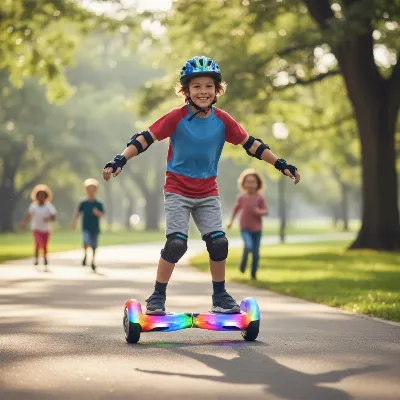 A child confidently riding a colorful hoverboard with LED lights in a park, laughing with friends in the background.
Essential Tips for Using and Maintaining Your Kids’ Hoverboard
Ensuring the longevity and safe enjoyment of a hoverboard goes beyond just the purchase. Proper usage and diligent maintenance are key.
- Always Wear Protective Gear: Safety first! Before your child steps on a hoverboard, they should always wear a properly fitted helmet, knee pads, elbow pads, and wrist guards. These can significantly reduce the risk of serious injury in case of a fall.
- Learn Proper Riding Technique:
- Foot Placement: Encourage your child to place their feet shoulder-width apart, centered on the footpads. Leaning too far forward or backward can cause sudden acceleration or stops.
- Dismounting Safely: Teach them to step off backward, one foot at a time, keeping their weight centered. Jumping off or stepping forward abruptly can cause the board to jerk.
- Start in a Safe, Open Area: For new riders, choose a flat, open space away from traffic, pedestrians, and obstacles. A smooth, clear surface is ideal for learning balance and control.
- Supervise Younger Riders: Children under 10, especially, should always be closely supervised while riding to ensure they follow safety guidelines and to assist them if needed.
- Pre-Ride Checks: Before each use, quickly inspect the hoverboard. Check the tires for any wear or damage, ensure the battery is sufficiently charged, and test the responsiveness of the self-balancing system.
- Charging Best Practices:
- Always use the original charger provided with the hoverboard.
- Charge in a well-ventilated, open area on a non-flammable surface.
- Never leave the hoverboard charging unattended, especially overnight, to prevent overheating or fire risks.
- Proper Storage: Store the hoverboard in a cool, dry place, away from direct sunlight or extreme temperatures. If storing for a long period, ensure the battery has a partial charge (around 50%) to help maintain its health.
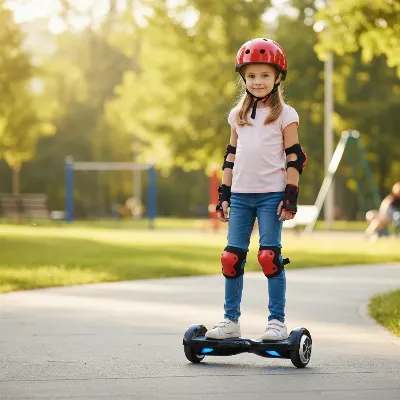 A child wearing a helmet, knee pads, and elbow pads while standing next to a hoverboard, emphasizing safety.
Where to Buy Kids’ Hoverboards
Purchasing a hoverboard from a reliable source is just as important as choosing the right model.
- Reputable Online Retailers: Large online marketplaces like Amazon are popular for their wide selection and competitive pricing. Always check seller ratings and product reviews.
- Specialty Stores: Some electronics or sporting goods stores may carry hoverboards, offering the advantage of in-person inspection and expert advice.
- Check Return Policies: Before purchasing, especially online, familiarize yourself with the retailer’s return and warranty policies in case of defects or if the hoverboard isn’t the right fit for your child.
Buying Guide: What Parents Need to Know
As a parent, your primary concerns likely revolve around safety, value, and suitability. Here’s a concise guide to navigating these aspects.
Budget Considerations
Hoverboards are available across a spectrum of prices, but the cheapest option isn’t always the best, particularly when it comes to safety and durability. Mid-range models often strike the ideal balance between cost and quality. Investing a little more upfront in a UL 2272 certified board from a reputable brand can save you headaches and ensure a safer, more enjoyable experience in the long run.
Key Features to Prioritize
When making your final decision, focus on these non-negotiables and desirable additions:
- UL 2272 Certification: This is paramount for electrical and fire safety.
- Appropriate Wheel Size and Weight Limit: Match these to your child’s age, weight, and intended riding environment.
- Self-Balancing Feature/Learning Mode: These greatly assist beginners in mastering the ride.
- Durable Build Quality: Look for robust construction that can withstand typical kids’ play.
- LED Lights: Enhance visibility, especially during evening rides, and add to the fun.
- Bluetooth Speaker: A popular feature for kids who enjoy music while they ride.
Safety First: Certifications and Precautions
The past decade has seen significant improvements in hoverboard safety standards, largely due to the widespread adoption of UL 2272 certification.
“Modern hoverboards, when chosen carefully and used correctly, are a reasonable activity for children aged eight and above. Understanding what the UL 2272 certification actually means… makes a real difference to how safe and enjoyable the experience turns out to be.” – Alex Thompson, Consumer Electronics Analyst
Beyond certification, parental vigilance is key. Always ensure your child wears all necessary protective gear, supervises their riding, and teaches them to be aware of their surroundings. Discuss local regulations regarding hoverboard use, as some areas may have restrictions on public roads or sidewalks.
Conclusion
Choosing the best hoverboard for your child involves a thoughtful balance of fun features, robust performance, and unwavering safety. By prioritizing UL 2272 certification, selecting the appropriate wheel size and features for your child’s age and skill level, and adhering to safe riding practices, you can provide an exciting and secure mode of personal transport. Whether they’re cruising the neighborhood or tackling light trails, the right hoverboard offers not just a ride, but an opportunity for kids to develop balance, coordination, and a sense of adventure. Which hoverboard feature do you think your child would be most excited about?
Frequently Asked Questions
Frequently Asked Questions
What is the appropriate age for a child to start riding a hoverboard?
Most manufacturers and safety guidelines recommend hoverboards for children aged 8 and above. Younger children (5-7) may use smaller, beginner-mode-only models under close adult supervision and with full protective gear, but their balance and coordination are still developing.
Why is UL 2272 certification so important for hoverboards?
UL 2272 certification is crucial because it indicates that the hoverboard's electrical system, including its battery and charger, has undergone rigorous testing for fire and electrical safety. This certification significantly reduces the risk of overheating, short-circuiting, or battery fires, which were common safety concerns in earlier models.
How long do hoverboard batteries typically last before needing replacement?
With proper care and regular use, a hoverboard's lithium-ion battery can last 1 to 2 years before experiencing noticeable degradation in performance or range. To extend battery life, avoid complete discharges, charge in moderation, and store the board with a partial charge if not in use for extended periods.
Can hoverboards go uphill?
Yes, most hoverboards can handle inclines, but their ability varies depending on motor power and wheel size. Standard 6.5-inch models can typically manage gentle slopes, while hoverboards with more powerful motors and larger wheels (8-inch or 10-inch) are better equipped to tackle steeper grades, some up to a 30-degree incline.
What are the key features to prioritize when buying a hoverboard for a child?
When buying a hoverboard for a child, prioritize UL 2272 certification for safety, appropriate wheel size and weight limit for their age and riding environment, and self-balancing features for beginners. Additional desirable features include durable build quality, LED lights for visibility, and a Bluetooth speaker for entertainment.
How to Choose the Best Hoverboard for Your Child
Choosing the best hoverboard for your child involves considering their usage needs, key technical specifications, and reputable brands to ensure safety and enjoyment.
Consider how and where your child will use the hoverboard, including the purpose (recreation, commuting, off-road) and intended terrain (smooth sidewalks, parks, rough trails). Match the hoverboard's wheel size and weight limits to your child's age and weight for optimal safety and performance.
Evaluate wheel size, motor power (in watts), max speed, range, and battery life. Prioritize models with a UL 2272 certification for electrical and fire safety, and look for features like learning modes or adjustable speed settings for beginners.
Invest in reputable brands like Hover-1, Gotrax, or Razor, which are known for quality and safety. Hoverboards for kids typically range from $100-$300+, with mid-range models often offering the best balance of features and safety certifications.
Always ensure the hoverboard has UL 2272 certification. Look for non-slip footpads, LED lights for visibility, and a Battery Management System (BMS) to prevent overcharging. Parental supervision and protective gear are also essential for safe riding.
Get our weekly buyer guide
Practical specs, not advice. Unsubscribe anytime.

The Hover-1 Dream was exactly what we were looking for! My daughter is 10 and wanted something fun but also safe. The features are great for her age group, and it feels really sturdy. It’s been a fantastic way to get her outside and active, and she’s already showing off her new skills.
I bought the Gyroor Warrior Off-Road for my nephew, thinking the bigger wheels would be better for our yard. While it handles grass okay, it’s a bit heavier than I expected, and he struggles to carry it sometimes. It’s super durable though, and the motor power is impressive for tackling small inclines.
My daughter loves her new hoverboard. We went with one of the standard models, and it’s great for cruising around our paved patio. The battery life is decent, but I do wish it lasted a little longer between charges. Still, for the price, it’s a solid choice and she’s having a blast.
We got the Gotrax Edge for my son’s 8th birthday, and it’s been a huge hit! The 6.5-inch wheels are perfect for him as a beginner, and he picked it up so fast. I really appreciate knowing it has the UL 2272 safety certification, gives me peace of mind while he’s riding around the driveway. Definitely recommend for younger kids.