Maintaining a hoverboard is essential for its longevity, performance, and safety, requiring diligent care from the moment it’s unboxed. Neglecting proper maintenance can lead to diminished battery life, sluggish operation, and costly repairs. This guide provides essential knowledge and practical tips to keep your hoverboard running smoothly, looking its best, and providing countless hours of enjoyment, ensuring your investment remains in top condition for years.
Understanding Your Hoverboard for Optimal Care
Hoverboards vary in design, from two-wheelers for urban commutes to rugged all-terrain models. While core maintenance principles apply universally, tailoring care to your specific hoverboard type is beneficial. For example, an off-road hoverboard with pneumatic tires requires regular tire pressure checks and frequent cleaning of debris from its wheels and suspension. Standard hoverboards for smooth surfaces may need more attention to footpad cleanliness for responsive sensor operation. Understanding these nuances helps apply the correct maintenance strategy, preventing premature wear and maintaining optimal functionality.
Essential Hoverboard Maintenance Practices
Keeping your hoverboard in pristine condition involves regular practices, including meticulous cleaning, smart battery management, and careful storage. Adhering to these tips will significantly enhance your hoverboard’s lifespan and reliability. For browse all hoverboard sales articles on this site.
Cleaning Your Hoverboard
Regular cleaning is fundamental to both the aesthetics and performance of your hoverboard. Dirt, dust, and grime can accumulate on its surface, wheels, and sensors, potentially impacting its operation.
To clean your hoverboard effectively:
- Power Off and Unplug: Always ensure your hoverboard is powered off and unplugged from any charging source before you begin cleaning for safety.
- Wipe Down the Exterior: Use a soft, slightly damp cloth to gently wipe down the main body of the hoverboard. Avoid using excessive water, which can damage internal electronic components.
- Address Wheels and Footpads: Pay special attention to the wheels, tires, and footpads, as these areas tend to collect the most dirt and debris. A small brush can be effective for dislodging grime from around the wheels.
- Avoid Harsh Chemicals: Opt for a mild detergent diluted in water if stubborn stains are present. Harsh chemicals or abrasive materials can damage the hoverboard’s finish or sensitive parts.
- Dry Thoroughly: After cleaning, make sure to dry your hoverboard completely to prevent moisture-related issues.
> “A clean hoverboard isn’t just about appearances; it’s about preventing dirt and debris from interfering with critical sensors and moving parts, which is key to a smooth and safe ride.” – Admin, reviewsachhn.com Technician
Powering Up: Battery Care
The battery is the core of your hoverboard, and its proper care is crucial for maintaining performance and extending its lifespan. Hoverboards typically use rechargeable lithium-ion batteries, which benefit from specific charging and storage habits.
- Use the Original Charger: Always use the manufacturer-approved charger that came with your hoverboard. Generic chargers may not provide the correct voltage or current, potentially damaging the battery.
- Avoid Overcharging: Disconnect the charger once the battery is fully charged. Overcharging can degrade battery health over time. Many hoverboards take approximately 1.5 to 3 hours to fully charge.
- Charge Regularly but Not Excessively: It’s a good practice to charge your hoverboard after every ride, or when the battery level drops below 20%. However, storing a hoverboard with a completely drained battery can also be detrimental.
- Mind the Temperature: Store your hoverboard and charge its battery in a cool, dry place. Extreme temperatures, both hot and cold, can significantly impact battery life and performance. If the hoverboard feels hot while charging, unplug it immediately and let it cool.
- Long-Term Storage: If you plan not to use your hoverboard for an extended period, charge the battery to approximately 50% before storing it. This helps prevent deep discharge and maintains battery health. Remember to periodically check and recharge it every two months during prolonged storage.
Wheel and Tire Vigilance
|
Our Picks for the Best Hover Board in 2026
As an Amazon Associate I earn from qualifying purchases.
|
||
| Num | Product | Action |
|---|---|---|
| 1 | K2 Self-Balancing Scooter Go Kart with Rear Shock Absorption, Balancing Scooter Seat Attachment for 6.5" 8" 10" Tires, Adjustable Length & Off-Road Wheel( (Not Including Balancing Scooter) |

|
| 2 | Self Balance Scooter Seat Attachment 6.5” Two-Wheel Self Balancing Electric Scooter with LED Light Flash Lights Wheels |
|
| 3 | INMOTION E20 Electric Unicycle Hoverboard for Beginners – 14" Wheel, 900W Motor, 18.6 Miles Range, 12.5mph, UL2272 Certified – Lightweight & Safe Self-Balancing Scooter |
|
| 4 | LIEAGLE Hoverboard, 6.5" Self Balancing Scooter Hover Board with Bluetooth Wheels LED Lights for Kids Adults |
|
| 5 | Hover-1 My First Self Balancing Scooter for Kids with 5 mph Max Speed, Dual 150W Motors, 6.3” Tires, 3 Miles Max Range, and LED Headlights |
|
| 6 | Self-Balancing Scooter Skin Hoverboard Sticker Adult e Scooter Electric Scooter for Adults Reflective |
|
| 7 | Razor Hovertrax 2.0 Hoverboard, UL2272 Certified Self-Balancing Hoverboard Scooter, for Kids Age 8+ |
|
| 8 | 8.5” All Terrain Hover Board, Off Road Self Balancing Scooter with Bluetooth and LED Lights, UL2272 Safety Certified |
|
| 9 | Gyroor Self Balancing Scooters Seat Attachment - Go Kart Conversion for 6.5'' to 10'' Self Balancing Scooters, Adjustable Frame Length, Perfect for Kids and Adults |
|
| 10 | K1 Go-Kart Seat Attachment for Self-Balancing Scooters, Adjustable Frame Fits 6.5"/8"/10" Boards, Easy Install, Kids & Family Fun (Scooter Not Included)–Classic Black |
|
The wheels and tires are your hoverboard’s connection to the ground, and their condition directly affects your ride quality and safety.
- Regular Inspection: Frequently inspect your wheels and tires for any signs of wear, cracks, punctures, or embedded debris like stones or glass. Replace damaged tires or wheels promptly.
- Maintain Tire Pressure (for pneumatic tires): If your hoverboard has inflatable tires, check and maintain them at the manufacturer’s recommended pressure. Under-inflated tires can affect stability and battery range, while over-inflated tires can reduce grip and absorb less shock.
- Clean Wheels: Keep the wheel hubs and tires free from dirt and debris. Buildup can cause friction, affect balancing, and reduce overall efficiency.
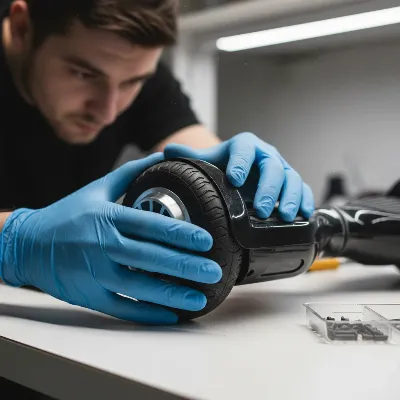 A technician inspecting the wheels of a hoverboard for wear and tear.
Smart Storage Solutions
Proper storage is key to protecting your hoverboard from environmental damage and extending its operational life.
- Cool, Dry Location: Always store your hoverboard in a cool, dry environment, away from direct sunlight, excessive heat, and moisture. Extreme temperatures can degrade battery components and warp plastic parts.
- Dust and Dirt Protection: Use a protective cover or a dedicated hoverboard case to shield your device from dust and dirt accumulation during storage. This also helps prevent accidental scratches.
- Avoid Physical Damage: Store your hoverboard in a safe place where it won’t be easily knocked over or subjected to heavy objects falling on it.
Software and Safety Checks
Modern hoverboards often come with smart features and companion apps that offer firmware updates, which are vital for optimal performance and safety.
- Keep Software Updated: If your hoverboard has a companion app, regularly check for and install any available firmware updates. These updates often include performance enhancements, bug fixes, and improved safety protocols.
- Safe Riding Practices: How you ride your hoverboard significantly impacts its longevity. Avoid riding on excessively rough terrain not suitable for your specific model, exceeding the weight limit, or riding at maximum speeds for prolonged periods. Smooth, controlled movements reduce strain on the motors and electronic components.
Troubleshooting Common Hoverboard Issues
While consistent maintenance can prevent many problems, occasional issues may arise. Simple troubleshooting can often resolve these:
- Hoverboard Not Balancing: Often, recalibrating your hoverboard can fix balancing issues. Refer to your user manual for the specific recalibration steps, which typically involve placing it on a flat surface and holding the power button.
- Battery Not Charging: Ensure the charger is properly connected and the outlet is working. If the issue persists, the charger or battery might need replacement, or there could be an internal wiring fault.
- Unusual Noises: Squeaks or grinding sounds often indicate debris in the wheels or a need for lubrication in moving parts. Clean the wheels thoroughly and inspect for any foreign objects.
Expert Tips for Extending Hoverboard Lifespan
Beyond the routine, a few expert insights can further safeguard your hoverboard and maximize its operational life. Regularly inspecting your hoverboard for loose screws or connections can prevent minor issues from escalating into major repairs. If you notice any unusual behavior, such as a burning smell, excessive heat, or flickering lights, discontinue use immediately and seek professional advice. Professional servicing, especially for complex electrical or mechanical issues, is highly recommended to ensure proper diagnosis and repair. Many retail stores or specialized repair shops can offer expert assistance, ensuring your hoverboard is handled by knowledgeable technicians.
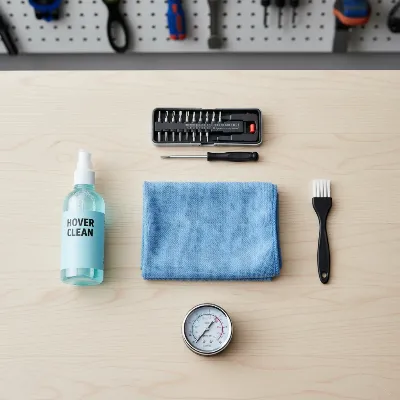 Essential tools for hoverboard maintenance laid out on a workbench.
Conclusion
Maintaining your hoverboard is an investment in its future, ensuring that your ride remains safe, efficient, and enjoyable. From routine cleaning and meticulous battery care to vigilant checks on wheels and tires, each step plays a crucial role in extending your hoverboard’s lifespan. Remember to store your device properly and keep its software updated to benefit from the latest performance and safety enhancements. By integrating these essential maintenance tips into your routine, you’re not just preserving a gadget; you’re safeguarding an experience.
Frequently Asked Questions
How often should I clean my hoverboard for optimal performance?
For daily riders, a quick wipe-down after each use is recommended, with a more thorough cleaning of wheels and footpads weekly. A deeper clean, addressing intricate areas and ensuring all debris is removed, should be performed monthly to prevent buildup and maintain optimal sensor function.
Is it safe to leave my hoverboard charging overnight?
It is generally advised against leaving your hoverboard charging overnight. While most modern hoverboards have overcharge protection, continuous charging after reaching full capacity can still put unnecessary stress on the battery, potentially shortening its overall lifespan. Always disconnect the charger once the battery is full, which typically takes 1.5 to 3 hours.
What steps should I take if my hoverboard gets wet?
If your hoverboard gets wet, immediately power it off and avoid attempting to charge or use it. Thoroughly dry the exterior with a cloth and place it in a dry, well-ventilated area for several days to allow any internal moisture to evaporate. Do not use heat sources like hairdryers, as this can cause further damage. If performance issues persist, consult a professional.
What are the optimal temperature ranges for riding and storing a hoverboard?
Riding or storing your hoverboard in extreme temperatures (below freezing or above 100u00b0F/38u00b0C) can negatively affect battery performance and longevity. The optimal operating temperature range is typically between 50u00b0F and 86u00b0F (10u00b0C and 30u00b0C) to ensure the battery and internal components function safely and efficiently.
How can I tell if my hoverboard battery needs to be replaced?
Signs that your hoverboard battery may need replacing include a significantly reduced range, taking longer to charge, not holding a charge for long, or the hoverboard shutting off unexpectedly even after a full charge. If you observe these symptoms, it's best to have the battery professionally tested or replaced.
Clean Your Hoverboard Effectively
Regular cleaning is crucial for both the aesthetics and performance of your hoverboard, preventing dirt and grime from impacting its operation.
For safety, always ensure your hoverboard is powered off and unplugged from any charging source before you begin cleaning. This prevents accidental activation or electrical hazards during the process.
Use a soft, slightly damp cloth to gently wipe down the main body of the hoverboard. Avoid using excessive water, as moisture can damage internal electronic components and lead to malfunctions.
Pay special attention to the wheels, tires, and footpads, as these areas accumulate the most dirt and debris. A small brush can be effective for dislodging grime from around the wheels and textured footpad surfaces.
Opt for a mild detergent diluted in water if stubborn stains are present on the hoverboard's surface. Harsh chemicals or abrasive materials can damage the hoverboard's finish or sensitive parts, leading to discoloration or material degradation.
After cleaning, make sure to dry your hoverboard completely to prevent moisture-related issues such as corrosion or electrical shorts. Use a dry cloth to absorb any remaining dampness before storage or use.
Get our weekly buyer guide
Practical specs, not advice. Unsubscribe anytime.

I’ve had my hoverboard for about a year now and was starting to notice the battery life wasn’t what it used to be. The tip about not overcharging and letting it cool down before charging again has made a huge difference! It’s like I have a brand new battery. So glad I found these tips.
My hoverboard was getting pretty sluggish, and I thought it was just getting old. Turns out, I wasn’t cleaning the debris from the wheels nearly enough! After following the cleaning routine mentioned, it’s zipping around like it did when I first got it. These simple steps really do make a difference for performance.
The section on checking tire pressure for pneumatic tires was super useful. I honestly hadn’t thought much about it until my ride started feeling a bit wobbly. A quick check and adjustment made it feel much more stable and safer. Definitely a must-read for anyone with an off-road hoverboard.
Good general advice, but I was hoping for more specific info on cleaning the internal components. My all-terrain model gets really dirty, and while the wheel cleaning tips were helpful, I’m still a bit unsure about how to safely get into the tougher spots without damaging anything. Still, some solid reminders here.