The world of self-balancing electric scooters, commonly known as hoverboards, has seen remarkable innovation since their inception. For many enthusiasts and new riders, the Razor Hovertrax 2.0 stands out as a prominent choice. But how does it truly fare in terms of quality, durability, and overall performance? This in-depth quality test review delves into the engineering, safety standards, and practical user experience of the Razor Hovertrax 2.0 to help you understand if it meets your expectations and needs.
Popular Hover Board Types
Hoverboards have evolved significantly, offering a range of options beyond the classic two-wheeled self-balancing board. You’ll find models designed for different terrains, some with integrated handlebars for added stability, and even those with larger wheels for off-road adventures. The most common type, and the category into which the Razor Hovertrax 2.0 falls, is the two-wheeled self-balancing scooter. These are ideal for smooth surfaces, offering a intuitive and engaging ride. While other types cater to specific niches like rugged outdoor use or enhanced control, the standard self-balancing hoverboard prioritizes ease of use and portability, making it a popular choice for recreational riding and short-distance commuting on paved paths.
The Razor Hovertrax 2.0 specifically features a two-wheeled, self-balancing design. This classic configuration is well-suited for beginners and intermediate riders looking for a straightforward and enjoyable experience. Its primary advantage lies in its accessibility and the pure, unadulterated sensation of gliding, making it an excellent entry point into personal electric mobility.
How to Choose a Hover Board
Selecting the perfect hoverboard requires careful consideration of several factors tailored to your individual needs and expectations. Understanding these aspects will ensure you invest in a device that not only performs well but also aligns with your lifestyle and safety priorities. From the intended use to the technical specifications, every detail contributes to a satisfying riding experience.
Determining Your Usage Needs
Before diving into specifications, consider how you intend to use your hoverboard. Is it for casual fun in the park, short commutes to school or work, or perhaps for recreational sport? The Razor Hovertrax 2.0, for instance, is highly regarded as an excellent entry-level option, perfectly suited for younger riders and those new to hoverboarding. If you’re an experienced user seeking high speeds or extreme maneuvers, you might need to explore more advanced models. Terrain also plays a crucial role; while the Hovertrax 2.0 handles paved surfaces and even slightly rougher concrete terrains smoothly, extensive off-road riding would necessitate a hoverboard with larger, more robust wheels and increased ground clearance. Identifying your primary purpose and typical riding environment is the first step towards a smart purchase.
Key Technical Specifications
|
Our Picks for the Best Hover Board in 2026
As an Amazon Associate I earn from qualifying purchases.
|
||
| Num | Product | Action |
|---|---|---|
| 1 | K1 Go-Kart Seat Attachment for Self-Balancing Scooters, Adjustable Frame Fits 6.5"/8"/10" Boards, Easy Install, Kids & Family Fun (Scooter Not Included)–Classic Black |

|
| 2 | Self Balance Scooter Seat Attachment 6.5” Two-Wheel Self Balancing Electric Scooter with LED Light Flash Lights Wheels |
|
| 3 | 8.5” All Terrain Hover Board, Off Road Self Balancing Scooter with Bluetooth and LED Lights, UL2272 Safety Certified |
|
| 4 | Self-Balancing Scooter Skin Hoverboard Sticker Adult e Scooter Electric Scooter for Adults Reflective |
|
| 5 | LIEAGLE Hoverboard, 6.5" Self Balancing Scooter Hover Board with Bluetooth Wheels LED Lights for Kids Adults |
|
| 6 | Razor Hovertrax 2.0 Hoverboard, UL2272 Certified Self-Balancing Hoverboard Scooter, for Kids Age 8+ |
|
| 7 | Hover-1 My First Self Balancing Scooter for Kids with 5 mph Max Speed, Dual 150W Motors, 6.3” Tires, 3 Miles Max Range, and LED Headlights |
|
| 8 | Gyroor Self Balancing Scooters Seat Attachment - Go Kart Conversion for 6.5'' to 10'' Self Balancing Scooters, Adjustable Frame Length, Perfect for Kids and Adults |
|
| 9 | INMOTION E20 Electric Unicycle Hoverboard for Beginners – 14" Wheel, 900W Motor, 18.6 Miles Range, 12.5mph, UL2272 Certified – Lightweight & Safe Self-Balancing Scooter |
|
| 10 | K2 Self-Balancing Scooter Go Kart with Rear Shock Absorption, Balancing Scooter Seat Attachment for 6.5" 8" 10" Tires, Adjustable Length & Off-Road Wheel( (Not Including Balancing Scooter) |
|
Understanding the technical specifications of a hoverboard is essential for evaluating its performance, safety, and longevity. These details directly impact your riding experience and the board’s durability.
- Wheel Size: Hovertrax 2.0 typically features standard wheel sizes optimized for smooth to moderately uneven surfaces. Larger wheels often indicate suitability for rougher terrain, while smaller wheels are best for indoor or perfectly smooth outdoor use.
- Motor Power: The Razor Hovertrax 2.0 is powered by dual hub motors, providing efficient and quiet operation. Its 350W peak motor power contributes to a smooth ride and responsive control, ideal for its target audience.
- Maximum Speed: With a top speed of 8 mph (13 km/h), the Hovertrax 2.0 offers a safe and enjoyable pace, particularly for new and younger riders. More advanced hoverboards can reach higher speeds, but often at a higher price point and with a steeper learning curve.
- Range and Battery Life: Equipped with a 36V lithium-ion battery, the Hovertrax 2.0 provides approximately 60 minutes of continuous ride time on a single charge. Real-world usage may vary slightly, but this offers ample time for recreational use. A significant advantage is its easily removable and swappable battery pack, meaning you can extend ride time with an extra battery or replace a faulty one without buying a new board.
- Charging Time: The battery typically charges fully in 1 to 4 hours, allowing for relatively quick turnarounds between rides.
- Safety Certifications (UL 2272): This is paramount. The Razor Hovertrax 2.0 boasts UL 2272 certification, guaranteeing it meets the highest electrical and fire safety standards. This certification is a critical indicator of a reliable and safe hoverboard, addressing past concerns about cheaper, uncertified models.
- Weight Limit: The Hovertrax 2.0 supports riders up to 220 lbs (100 kg), accommodating a wide range of users.
- Durability and Construction: The Hovertrax 2.0 features a shatter-resistant polymer frame, sometimes described as a steel frame, and fender bumper protection. These design elements are crucial for protecting the board from dings and bumps during use, contributing significantly to its longevity. The anti-slip rubber foot platforms also enhance rider security and control.
Brands and Pricing
Razor is a well-established brand in the personal mobility industry, known for its commitment to safety and quality, especially for youth products. The Hovertrax 2.0 is positioned as an excellent value entry-level hoverboard. While there are cheaper alternatives on the market, they often compromise on safety certifications and build quality. Conversely, high-end hoverboards with more advanced features, greater speed, and longer range will naturally come with a higher price tag. When considering the price, it’s vital to weigh it against the features, safety certifications, and brand reputation to ensure you’re making a sound investment in a reliable and safe product.
Comparison Table of Quality Indicators
| Feature | Razor Hovertrax 2.0 | Generic / Budget Hoverboards (Uncertified) | High-Performance Hoverboards (Certified) |
|---|---|---|---|
| Safety Certification | UL 2272 Certified | Often Lacking / Unknown | UL 2272 Certified (or equivalent) |
| Frame Material | Shatter-resistant Polymer / Steel Frame | Basic Plastic, less durable | High-grade Aluminum / Steel, robust composites |
| Durability Features | Fender bumper protection, anti-slip foot platforms | Minimal protection, cheap rubber | Reinforced chassis, advanced impact absorption |
| Battery Type | 36V Lithium-ion (Removable/Swappable) | Unspecified Li-ion (often lower quality, non-removable) | High-capacity Li-ion, often from reputable brands |
| Battery Life | ~60 minutes | 30-45 minutes, inconsistent | 60-120+ minutes, consistent |
| Max Speed | 8 mph (13 km/h) | 6-10 mph, variable | 10-15+ mph |
| Motor Power | Dual hub motors (350W peak) | Lower wattage, less reliable | Higher wattage, more powerful acceleration |
| Self-Balancing Tech | EverBalance® Technology, instant self-balancing | Basic / Manual balancing, less stable | Advanced sensors, highly stable |
| Target User | Beginners, younger riders, recreational | Children (often with less supervision), casual | Enthusiasts, experienced riders, demanding environments |
| Price Point | Mid-range for certified beginner models | Low-end | High-end |
Tips for Using and Maintaining Your Hover Board
Ensuring the longevity and optimal performance of your Razor Hovertrax 2.0, or any hoverboard, involves adopting safe riding practices and consistent maintenance. Adhering to these guidelines will not only keep your board in top condition but also enhance your safety during every ride.
Safe Usage Guidelines
- Read the Manual: Always start by thoroughly reading the instruction manual. It contains crucial information specific to your model.
- Wear Safety Gear: Always wear a helmet, knee pads, elbow pads, and wrist guards, especially when starting out.
- Practice in Open Spaces: Begin riding in a wide, open, and flat area free from obstacles and traffic. The Razor Hovertrax 2.0’s EverBalance technology and training mode can significantly aid new riders in building confidence.
- Learn to Mount and Dismount Safely: Always step on or off the hoverboard from the back. Practice mounting and dismounting until you feel completely stable.
- Maintain Proper Posture: Stand upright with a slight bend in your knees, keeping your core engaged. Look forward, not down at your feet.
- Respect Speed Limits: The Hovertrax 2.0 has an 8 mph top speed. Avoid exceeding safe speeds, especially in crowded areas or unfamiliar terrain.
- Be Aware of Surroundings: Pay constant attention to your environment, including pedestrians, vehicles, and changes in surface conditions.
- Avoid Wet Conditions: While some hoverboards have water resistance, it’s generally best to avoid riding in rain, through puddles, or on wet surfaces to prevent electrical damage and reduce slip hazards.
Extending Your Hover Board’s Lifespan
- Regular Cleaning: After each use, wipe down your hoverboard with a damp cloth to remove dirt, dust, and debris. Avoid using harsh chemicals or excessive water.
- Battery Care:
- Store the hoverboard with a partially charged battery (around 50-60%) if you plan not to use it for an extended period.
- Avoid completely draining the battery before recharging.
- Use only the charger provided by the manufacturer.
- Take advantage of the Hovertrax 2.0’s removable battery feature; if the battery life significantly diminishes, replacing just the battery pack can greatly extend the product’s life.
- Inspect Regularly: Periodically check the wheels, foot platforms, and frame for any signs of wear, damage, or loose components. The shatter-resistant frame and fender bumpers of the Hovertrax 2.0 are designed to withstand impacts, but regular inspection helps catch potential issues early.
- Proper Storage: Store your hoverboard in a cool, dry place away from direct sunlight and extreme temperatures.
- Avoid Overloading: Adhere to the maximum weight limit (220 lbs for Hovertrax 2.0) to prevent strain on the motors and internal components.
Common Issues and Troubleshooting
- Calibration Issues: If the hoverboard isn’t balancing correctly or drifts, it might need recalibration. Most hoverboards have a simple recalibration process (often involving holding it level while powered off, then turning it on).
- Battery Not Charging: Ensure the charger is properly connected and the outlet is working. If the battery is old, consider replacing it, which is easy with the Hovertrax 2.0’s swappable battery design.
- Unresponsive Motors: Check for any error lights or consult the manual. Sometimes a simple power cycle can resolve minor glitches. If issues persist, it might indicate an internal component problem.
Where to Buy a Hover Board
When purchasing a hoverboard, especially one like the Razor Hovertrax 2.0, it’s crucial to prioritize reputable retailers to ensure you receive an authentic product with warranty support and proper safety certifications.
For reliable purchases, consider major electronics retailers, dedicated toy stores, or sporting goods outlets known for carrying quality electric ride-on products. Online marketplaces can also be an option, but always verify the seller’s reputation and ensure the product clearly states its UL 2272 certification. When buying online, scrutinize product descriptions and customer reviews carefully. While the temptation to opt for cheaper, unbranded models might exist, the potential risks associated with uncertified hoverboards, particularly concerning battery safety, far outweigh any cost savings. Focusing on established brands like Razor, and purchasing from authorized dealers, offers peace of mind regarding product quality and safety compliance.
Buying Guide
Navigating the market for a new hoverboard can be overwhelming, but a focused approach on budget, features, and safety will simplify your decision. This guide helps you prioritize what matters most.
Budget Considerations
Your budget will significantly influence your choices in the hoverboard market. Entry-level, certified hoverboards like the Razor Hovertrax 2.0 typically fall into a mid-range price bracket, offering a balance of quality, safety, and performance for casual riders. If your budget is tighter, you might encounter uncertified models that, while cheaper, carry significant safety risks. Higher budgets open doors to more advanced features, greater speeds, longer ranges, and premium build materials. It’s often advisable to allocate a sufficient budget for a UL 2272 certified hoverboard to ensure safety and reliability over purely cost-driven decisions. Remember that investing a little more upfront for a quality product can save you from costly repairs or safety hazards down the line.
Essential Features to Consider
Beyond the core function of self-balancing, several features can enhance your hoverboard experience.
- Bluetooth Connectivity and Speakers: Many hoverboards, including some versions of the Hovertrax 2.0, feature integrated Bluetooth speakers, allowing you to stream music while you ride. This can add a fun dimension to your cruising.
- LED Lights: Beyond aesthetics, LED lights on the front and wheels significantly improve visibility, especially during dawn, dusk, or in low-light conditions. The Hovertrax 2.0 includes these for added safety.
- Riding Modes: Features like a “training mode,” as found on the Hovertrax 2.0, are excellent for beginners, limiting speed and increasing stability to help new riders build confidence.
- App Integration: Some advanced hoverboards offer companion apps for tracking speed, battery life, and even customizing riding modes.
- Portability: Consider the weight and any built-in handles if you’ll be carrying your hoverboard frequently.
Evaluate which features are truly important to you. While extra features can be appealing, ensure they don’t overshadow the fundamental aspects of safety and reliability.
Prioritizing Safety
Safety should always be the top priority when purchasing a hoverboard. The unfortunate history of hoverboard fires highlighted the critical importance of robust safety standards.
- UL 2272 Certification: As discussed, this certification is non-negotiable. It verifies that the electrical system and battery components have been rigorously tested and meet strict fire and electrical safety requirements. The Razor Hovertrax 2.0 proudly carries this certification.
- Durability and Build Quality: A sturdy, shatter-resistant frame (like the polymer or steel frame of the Hovertrax 2.0) and protective features like fender bumpers contribute to both the longevity of the board and rider safety by preventing structural failure during minor impacts.
- Self-Balancing Technology: Features like Razor’s EverBalance technology make it easier and safer for riders to get on and off, reducing the risk of falls due to instability.
- Braking and Control: A responsive control system that allows for smooth acceleration, turning, and stopping is vital for safe operation.
Always confirm these safety aspects before making a purchase. Never compromise on safety for a lower price, as the potential risks are too significant.
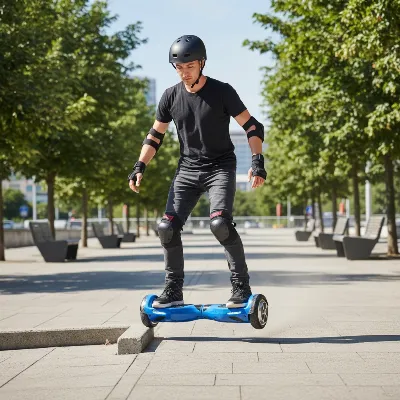 A Razor Hovertrax 2.0 hoverboard being tested for durability on a paved path, showing a rider navigating small bumps
Conclusion
The Razor Hovertrax 2.0 stands out as a reliable and high-quality hoverboard, particularly well-suited for new riders and those seeking a dependable recreational device. Its UL 2272 certification firmly establishes its safety credentials, while the shatter-resistant frame, fender protection, and EverBalance technology underscore its robust build and user-friendly design. With a comfortable 8 mph top speed and approximately an hour of ride time, it offers a balanced and enjoyable experience. The innovative removable battery pack is a significant advantage, enhancing both convenience and the board’s overall lifespan.
For anyone looking to enter the world of hoverboarding with a product that prioritizes safety, durability, and a smooth ride without breaking the bank, the Razor Hovertrax 2.0 is an exceptional choice. Are you ready to experience the effortless glide of a quality hoverboard?
Frequently Asked Questions
Is the Razor Hovertrax 2.0 safe to ride?
Yes, the Razor Hovertrax 2.0 is designed with safety as a top priority and is UL 2272 certified. This means its electrical system and battery have undergone rigorous testing to meet high fire and electrical safety standards, making it a safe option for riders.
How long does the battery last on a Razor Hovertrax 2.0?
The Razor Hovertrax 2.0 is equipped with a 36V lithium-ion battery that provides approximately 60 minutes of continuous ride time on a single charge. Actual usage may vary depending on rider weight, terrain, and riding style.
Can the Razor Hovertrax 2.0 battery be replaced?
Yes, a key feature of the Razor Hovertrax 2.0 is its easily removable and swappable battery pack. This allows users to replace the battery if it wears out or to extend ride time by carrying a spare, without needing tools.
What is the maximum speed of the Razor Hovertrax 2.0?
The Razor Hovertrax 2.0 has a top speed of 8 mph (approximately 13 km/h). This speed is considered safe and suitable for recreational riding, especially for beginners and younger users learning to navigate.
Is the Razor Hovertrax 2.0 good for beginners?
Absolutely. With its EverBalance self-balancing technology, responsive controls, and an optional training mode that limits speed, the Razor Hovertrax 2.0 is often recommended as one of the best hoverboards for beginners and younger riders to learn on.
Get our weekly buyer guide
Practical specs, not advice. Unsubscribe anytime.
