Few things are more disruptive to the joy of riding a hover board than a persistent, unyielding beep. This incessant sound often signals an underlying issue, transforming a fun ride into a frustrating mystery. While it might sound alarming, this beeping is actually your hover board’s way of communicating a problem, acting as a crucial safety and diagnostic alert. Understanding these signals and knowing how to respond can save you time, money, and the headache of a silenced ride. This comprehensive guide will help you decode your hover board’s warnings and provide five quick, actionable fixes to get you gliding smoothly again.
Understanding Your Hover Board’s Warning Signals
A hover board that won’t stop beeping is typically trying to tell you something is amiss. These devices are equipped with internal sensors and safety mechanisms designed to protect both the rider and the unit from potential damage. The continuous beep serves as an alert, indicating that one or more of these systems has detected an anomaly. From low power to environmental factors, various issues can trigger this audible warning, making prompt diagnosis key to resolution.
Common reasons your hover board might be beeping include a depleted battery, overheating components, an uneven riding surface, or misaligned internal sensors. It can also signal that the board is overloaded, exceeding its speed limits, or experiencing a software glitch. Occasionally, physical obstructions or loose internal wiring might also be the culprit. Recognizing these potential causes is the first step toward silencing the persistent alarm and enjoying your ride without interruption.
Diagnosing the Beep: How to Pinpoint the Problem
Before attempting any fixes, it’s essential to pinpoint the exact reason behind your hover board’s non-stop beeping. A systematic approach to diagnosis can help you identify the root cause quickly and accurately, preventing unnecessary repairs or interventions. Consider the context of when the beeping started and any accompanying visual cues, such as flashing lights.
Checking for Obvious Triggers
Start by observing your hover board for any immediate and obvious signs. Is the battery indicator light red or blinking, signaling a low charge? Has the device been used for an extended period, or does it feel unusually warm to the touch, suggesting overheating? 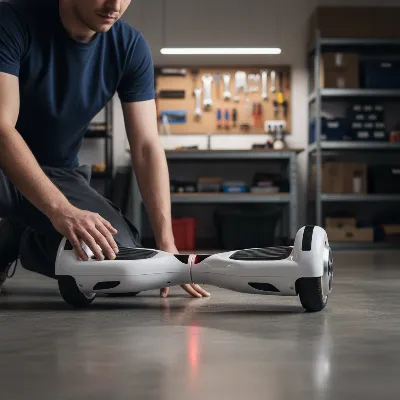 A person inspecting a hover board on a flat surface, checking for error lights and physical damage. Think about your riding environment: are you on an uneven surface, or have you recently traversed rough terrain? Have you pushed the hover board beyond its recommended speed or weight limits? These factors are common and often easily identifiable triggers for the warning beep. Also, check around the wheels and footpads for any visible debris or obstructions that might be impeding movement or sensor function.
What the Beep Might Mean
|
Our Picks for the Best Hover Board in 2026
As an Amazon Associate I earn from qualifying purchases.
|
||
| Num | Product | Action |
|---|---|---|
| 1 | INMOTION E20 Electric Unicycle Hoverboard for Beginners – 14" Wheel, 900W Motor, 18.6 Miles Range, 12.5mph, UL2272 Certified – Lightweight & Safe Self-Balancing Scooter |

|
| 2 | Hover-1 My First Self Balancing Scooter for Kids with 5 mph Max Speed, Dual 150W Motors, 6.3” Tires, 3 Miles Max Range, and LED Headlights |
|
| 3 | Self-Balancing Scooter Skin Hoverboard Sticker Adult e Scooter Electric Scooter for Adults Reflective |
|
| 4 | K2 Self-Balancing Scooter Go Kart with Rear Shock Absorption, Balancing Scooter Seat Attachment for 6.5" 8" 10" Tires, Adjustable Length & Off-Road Wheel( (Not Including Balancing Scooter) |
|
| 5 | Gyroor Self Balancing Scooters Seat Attachment - Go Kart Conversion for 6.5'' to 10'' Self Balancing Scooters, Adjustable Frame Length, Perfect for Kids and Adults |
|
| 6 | 8.5” All Terrain Hover Board, Off Road Self Balancing Scooter with Bluetooth and LED Lights, UL2272 Safety Certified |
|
| 7 | K1 Go-Kart Seat Attachment for Self-Balancing Scooters, Adjustable Frame Fits 6.5"/8"/10" Boards, Easy Install, Kids & Family Fun (Scooter Not Included)–Classic Black |
|
| 8 | Self Balance Scooter Seat Attachment 6.5” Two-Wheel Self Balancing Electric Scooter with LED Light Flash Lights Wheels |
|
| 9 | LIEAGLE Hoverboard, 6.5" Self Balancing Scooter Hover Board with Bluetooth Wheels LED Lights for Kids Adults |
|
| 10 | Razor Hovertrax 2.0 Hoverboard, UL2272 Certified Self-Balancing Hoverboard Scooter, for Kids Age 8+ |
|
Different hover board models might utilize specific beep patterns or combine the sound with distinctive light flashes to indicate particular error codes. While a universally standardized system doesn’t exist, a continuous beeping sound typically points to a critical issue requiring immediate attention. For instance, a persistent beep often suggests a low battery or a serious calibration problem. Red lights often accompany these beeps, adding a visual alert to the auditory warning. Consulting your hover board’s user manual can provide model-specific insights into what different beep and light combinations signify, helping you accurately interpret its “language” and guide your troubleshooting efforts.
5 Quick Fixes for Your Non-Stop Beeping Hover Board
Once you’ve identified potential causes, these five quick fixes can often resolve the issue and bring silence back to your hover board.
1. Recharge the Battery Completely
A low battery is one of the most common culprits behind a hover board’s incessant beeping. Most models are programmed to emit a warning sound when the battery level drops below a critical threshold, usually around 20%. This is a crucial safety feature to prevent unexpected power loss during a ride. To resolve this, simply connect your hover board to its charger and allow it to charge fully. The beeping should cease once the battery reaches a sufficient charge level. It’s good practice to avoid draining your battery completely to prolong its overall lifespan and prevent future warning beeps.
2. Allow for Adequate Cooling
Extended use, especially in warm environments or under heavy load, can cause the hover board’s internal components, such as the motor or battery, to overheat. When the internal temperature rises beyond safe limits, the hover board’s safety systems will trigger a beeping alarm to prevent damage. If your hover board feels unusually warm, immediately turn it off and let it rest in a cool, well-ventilated area for at least 30 minutes. Avoid resuming use until it has completely cooled down. This not only stops the beeping but also protects the critical internal components from potential long-term damage.
3. Recalibrate the Sensors
Calibration issues are a frequent cause of beeping, especially if your hover board feels unbalanced or behaves erratically. The gyroscopic sensors inside the hover board need to be properly aligned to accurately detect your movements and maintain balance. If these sensors are misaligned, perhaps due to rough handling or riding on an uneven surface, the board may beep continuously. To recalibrate:
- Turn off your hover board.
- Place it on a completely flat, level surface, ensuring it is not tilted.
- Press and hold the power button for approximately 10-15 seconds. You should hear a beep or see the lights flash, indicating the calibration process has begun.
- Release the power button, then turn the hover board off and on again to complete the reset.
This simple reset often re-aligns the internal gyroscopes, resolving balance-related beeping issues.
4. Inspect for Physical Obstructions and Damage
Sometimes, the beeping can be a mechanical warning. Physical obstructions like debris (pebbles, dirt, tangled hair) caught in the wheel mechanism can impede movement and strain the motor, triggering a beep. Similarly, minor physical damage to the footpads or sensors can lead to false readings and continuous beeping. Turn off your hover board and thoroughly inspect the wheels, footpads, and the underside of the board. Gently remove any visible debris. Ensure the footpads are clean and free of cracks or damage that might affect their pressure sensitivity. If you notice loose wires or significant damage, professional repair might be necessary.
5. Perform a System Reset
If the beeping persists after trying the above solutions, a software glitch or minor firmware issue might be the cause. Many hover boards have a built-in reset function that can clear these temporary electronic hiccups. While the exact method can vary by model, a common approach involves:
- Turning off the hover board.
- Locating the reset button, which is often a small pinhole near the charging port or power button.
- Using a paperclip or a similar pointed object to press and hold the reset button for a few seconds.
- Powering the hover board back on to see if the beeping has stopped.
Always refer to your specific hover board’s user manual for precise reset instructions, as incorrect procedures could potentially worsen the issue. “Don’t underestimate the power of a simple reset; it can often resolve electronic gremlins that aren’t immediately obvious.” – Alex Chen, E-Mobility Technician.
Proactive Maintenance: Keeping Your Hover Board Silent
Prevention is always better than cure, and regular maintenance can significantly reduce the chances of your hover board beeping unexpectedly. Establishing good habits for hover board care will extend its lifespan and ensure more reliable performance. Always charge your hover board after each significant use, but avoid overcharging by unplugging it once the indicator light turns green. This preserves battery health and prevents low-battery warnings.
Be mindful of your riding environment. Hover boards are designed for smooth, flat surfaces; frequently riding on rough terrain, steep inclines, or through puddles can strain the motors, confuse sensors, and lead to various malfunctions, including continuous beeping. Additionally, regularly clean the footpads and sensor areas with a dry cloth to prevent dirt and debris from interfering with their function. Adhering to the manufacturer’s recommended weight limit is also crucial, as overloading can strain the motor and battery, causing them to overheat and trigger warning signals.
When to Seek Expert Hover Board Repair
While many beeping issues can be resolved with simple DIY troubleshooting, there are instances when professional assistance is necessary. If you’ve diligently tried all the quick fixes and your hover board continues to beep, or if the beeping is accompanied by more severe symptoms like smoke, burning smells, or erratic movements, it’s time to seek expert repair. Persistent beeping could indicate serious internal problems such as battery failure, a malfunctioning motherboard, irreparably damaged sensors, or severe software corruption that requires specialized tools and knowledge to fix. Attempting complex repairs without expertise can void your warranty or even lead to further damage. A qualified technician can accurately diagnose deeper issues and perform the necessary repairs safely.
Hover Board Troubleshooting Guide: Beyond the Beep
Beyond simply silencing the beeping, adopting a proactive mindset toward hover board maintenance and understanding common issues can enhance your riding experience and extend the life of your device. This approach involves more than just reacting to problems; it’s about anticipating them and knowing how to respond comprehensively.
Budget for Potential Repairs
Even with diligent maintenance, mechanical and electronic devices can sometimes fail. It’s wise to set aside a small budget for potential hover board repairs, especially as your device ages. Costs can vary significantly depending on the issue, from minor sensor replacements to more extensive motherboard or battery swaps. Knowing your options for local repair shops versus manufacturer services can also help manage expectations and expenses. Some issues might be covered under warranty, so always check your documentation.
Recognizing Advanced Warning Signs
The continuous beep is a clear warning, but other, more subtle signs can indicate developing problems. Pay attention to changes in ride quality, such as a feeling of imbalance, reduced speed, or difficulty turning. Unusual noises, such as grinding or clicking from the wheels, could signal motor issues. If the hover board takes longer to charge, or its range significantly decreases, it might indicate battery degradation. Addressing these early warning signs can often prevent them from escalating into a persistent beeping problem. “Early detection of unusual performance is key to preventing major hover board malfunctions. Listen to your ride.” – Sarah Thompson, Hover Board Enthusiast & Reviewer.
Safety First: Handling Malfunctions
Your safety should always be the top priority when troubleshooting a malfunctioning hover board. Always turn off the device before performing any inspections or repairs. If you suspect battery damage (e.g., swelling, unusual heat, or leaking), handle the hover board with extreme caution and seek professional help immediately, as damaged lithium-ion batteries can pose a fire risk. Avoid riding a hover board that is behaving erratically or continuously beeping, as this could lead to falls or further damage. Always wear appropriate safety gear, even when just testing a repaired hover board.
Conclusion
A non-stop beeping hover board can be a puzzle, but it’s one that usually has a solution. By understanding that this sound is a warning signal, you can effectively diagnose and address common issues like low battery, overheating, or calibration errors. Implementing quick fixes such as charging, cooling, recalibrating, inspecting for obstructions, or performing a system reset can often restore your hover board to its silent, gliding glory. Remember, consistent maintenance and recognizing early warning signs are crucial for a long-lasting and enjoyable riding experience. Don’t let a simple beep keep you grounded—take action, and get back to exploring! What other hover board troubleshooting mysteries have you encountered?
Frequently Asked Questions
Why does my hover board beep even when fully charged?
If your hover board beeps despite a full charge, the issue likely isn’t the battery. Common causes include miscalibrated sensors, internal malfunctions, or obstructions. Try recalibrating the board and inspecting for debris before seeking professional help.
Can cold weather make my hover board beep?
While not a primary cause, extreme cold can affect battery performance and sensor calibration, potentially leading to beeping. It’s best to operate and store hover boards within their recommended temperature ranges to prevent such issues.
What does it mean if my hover board beeps and flashes red lights?
A hover board that beeps and flashes red lights typically indicates a more critical error. This could point to a very low battery, severe overheating, or a significant internal malfunction like faulty sensors or motherboard issues requiring immediate attention.
Is it safe to ride a hover board that is continuously beeping?
No, it is generally not safe to ride a hover board that is continuously beeping. The beeping is a warning signal, and ignoring it could lead to unexpected shutdowns, loss of balance, or further damage to the device, increasing the risk of injury.
How often should I recalibrate my hover board to prevent beeping?
There’s no fixed schedule for recalibration. You should recalibrate your hover board whenever it feels unbalanced, behaves erratically, or starts beeping due to suspected sensor issues. Regular calibration, perhaps once a month with frequent use, can also be a good preventive measure.
Get our weekly buyer guide
Practical specs, not advice. Unsubscribe anytime.
